 Tax Genie
Sri Lankan personal income tax estimator
Your Sri Lankan income tax, worked out in minutes.
Answer a few plain-English questions about your income and get a full, line-by-line breakdown of how the tax was calculated. Every Year of Assessment since 2018/19, free, with no account.
- No account
- Data stays on your phone
- 2018/19 to 2026/27
An estimate for general guidance, not tax advice. Tax Genie is an independent app and is not affiliated with the Inland Revenue Department.
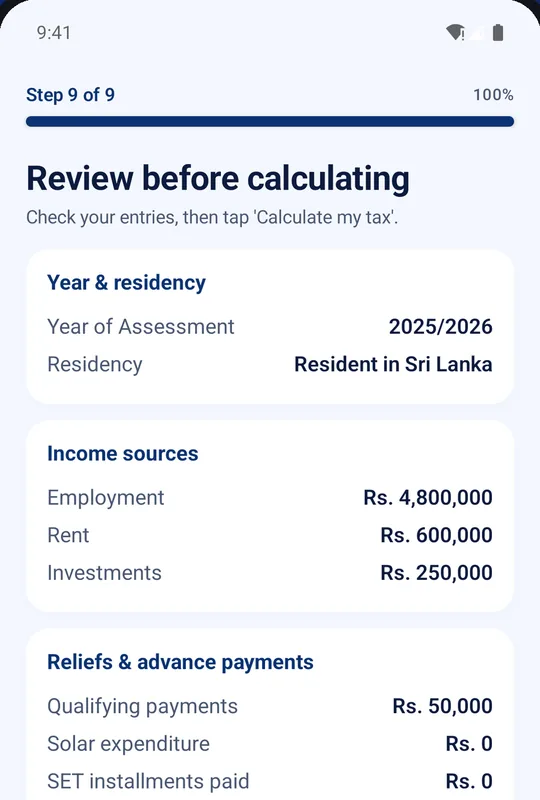
Review before calculating
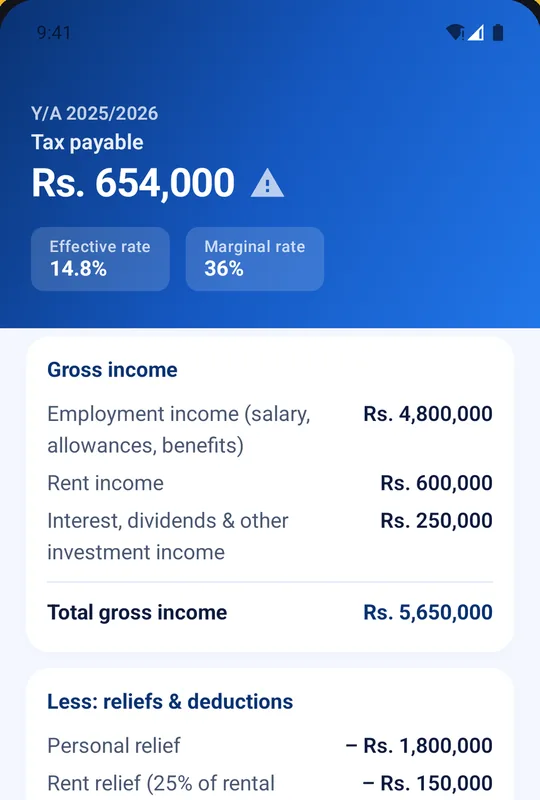
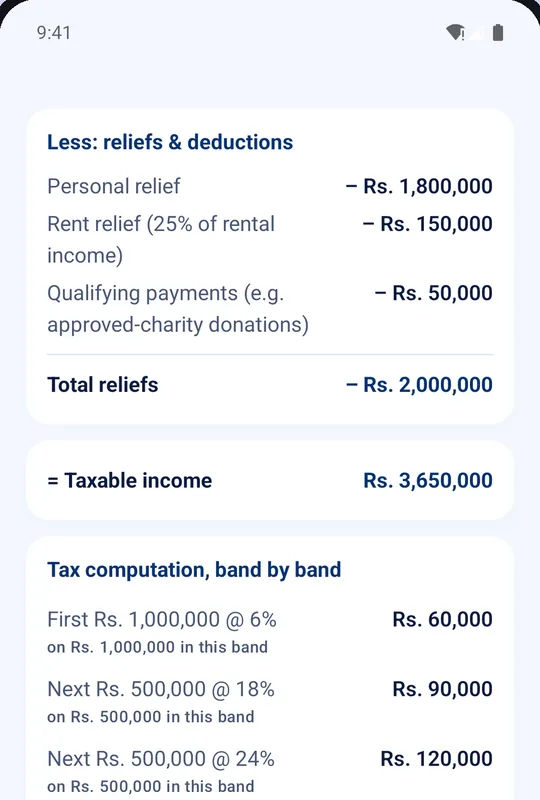
Sample figures from the app: Rs. 834,000 tax on Rs. 3,650,000 taxable income, less Rs. 180,000 already withheld.
How it works
Nine steps. One question at a time.
Tax Genie walks you from the tax year to the result. Every screen below is from the real app.
-
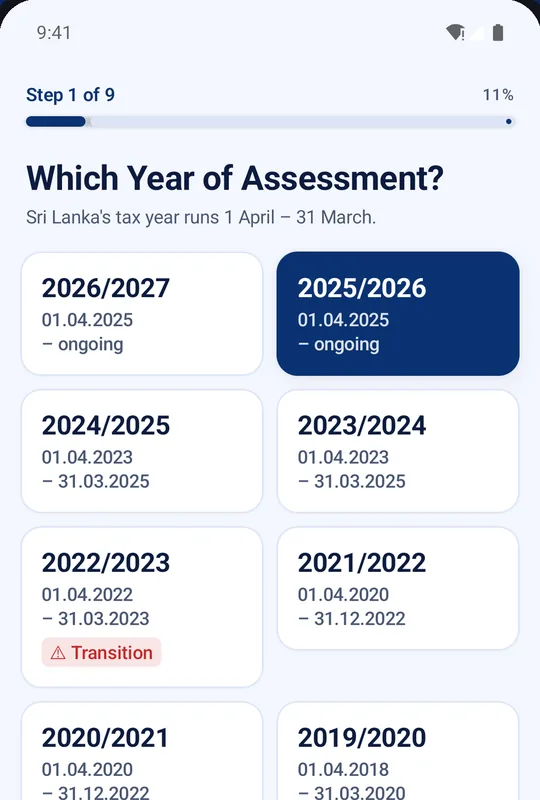
Pick the Year of Assessment
Choose any year from 2018/19 to 2026/27. The right rates and reliefs for that year are applied for you. Sri Lanka's tax year runs 1 April to 31 March, and 2022/23 is clearly marked as a transition year.
-
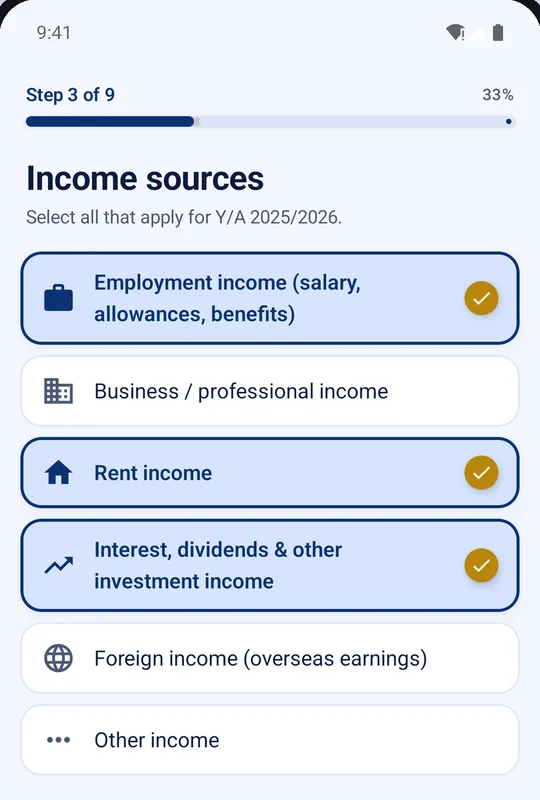
Tell it where your income comes from
Select everything that applies for that year. You only get questions about the sources you pick.
- Employment
- Business or professional
- Rent
- Interest, dividends and investments
- Foreign income
- Other
-
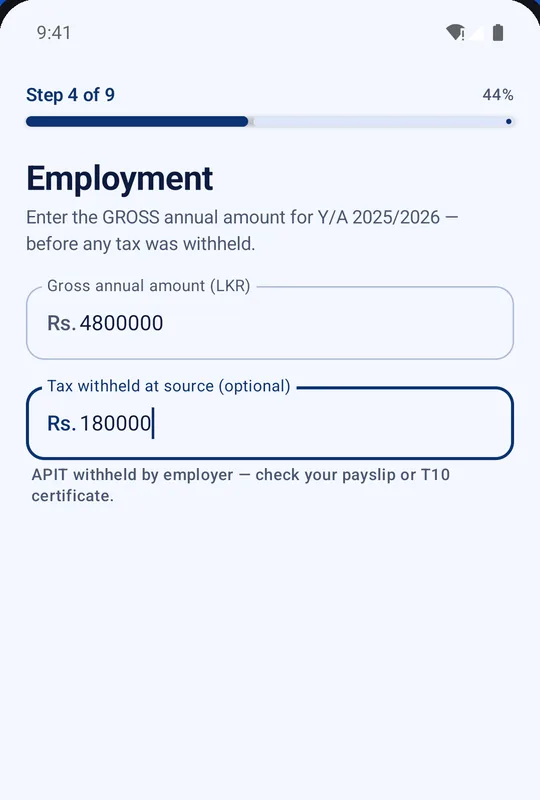
Plain-English questions
Enter your gross income, the amount before any tax was taken off, and any tax already withheld at source. For employment, that is the APIT shown on your payslip or T10 certificate.
-
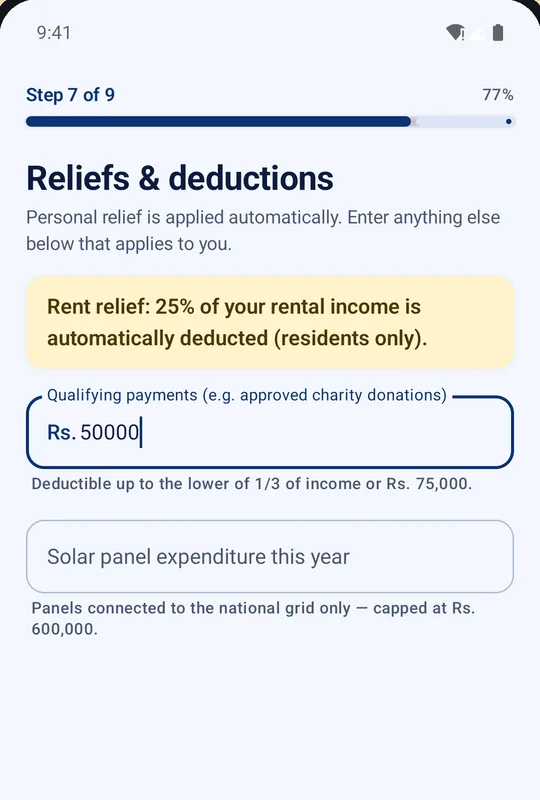
Reliefs and deductions, handled
Personal relief is applied automatically, and so is rent relief for residents. Add anything else that applies: approved charity donations and other qualifying payments, solar panel expenditure, and SET instalments paid.
The app shows each limit beside the field, so you can see what is allowed for the year you picked.
-
Check everything, then calculate
Step 9 is a single review screen with your year, residency, income sources, reliefs and advance payments. Fix anything that looks off, then tap Calculate my tax.
-
Read your result
Tax payable sits front and centre, with your effective rate and marginal rate beside it. Scroll for the full breakdown.
Features
Built to show its working, not just an answer.
A tax figure is only useful if you can see where it came from. Tax Genie keeps every step visible.
Every tax year since 2018/19
Nine Years of Assessment across five rate regimes. Pick the year and the right bands and reliefs are used.
Plain-English questions
No tax jargon. The wizard asks one thing at a time, and only about the income sources you chose.
Reliefs handled
Personal relief and rent relief (residents) are automatic. Add qualifying payments such as approved donations, solar costs and SET instalments.
Tax already withheld
Enter tax withheld at source, such as APIT from your employer, and see it in your result.
Effective and marginal rate
See what share of your income goes in tax, and the rate on your next rupee earned.
Line-by-line breakdown
Gross income, reliefs, taxable income and the tax on each band, laid out so you can follow every figure.
Review before you calculate
One screen summarises all your answers, so you can catch a typo before it changes the result.
Recent calculations
Your last few calculations are kept on your own phone so you can glance back. Clear them any time from inside the app.
Free, no account
Nothing to sign up for. The app is supported by ads from Google AdMob.
Every tax year
From 2018/19 to 2026/27, with the right rules for each.
Sri Lanka's personal income tax rules have changed several times since 2018. Each regime in Tax Genie is dated, so the year you pick decides the rates and reliefs. Tap a year to see its regime.
Regime 1
From 1 April 2018. Covers 2018/19 and 2019/20.
Regime 2
From 1 April 2020. Covers 2020/21 and 2021/22.
Transition year
2022/23, with a rate change part-way through the year.
Regime 4
From 1 April 2023. Covers 2023/24 and 2024/25.
Regime 5
From 1 April 2025, ongoing. Covers 2025/26 and 2026/27.
About 2022/23. The rules changed on 1 January 2023, in the middle of that year. Tax Genie calculates the whole year under the earlier rules and shows a clear warning. If you need an exact figure for that year, check the Inland Revenue Department's guidance.
The breakdown
See exactly how it was worked out.
The result screen lists income, reliefs, taxable income and the tax on each band. This is the example from the app's own screenshots: a Rs. 3,650,000 taxable income in Y/A 2025/2026.
Privacy
The calculation happens on your phone.
Tax Genie has no accounts and no server of ours that receives your answers. Here is what that means in practice.
No account, no profile
There is no sign-in. We do not collect your name, email, phone number, ID number, Tax Identification Number or any income figure you enter.
Calculated locally
No backend receives your answers. All calculations run on your device.
History stays with you
Your last few calculations are stored only in the app's on-device storage. Clearing the app's data, or using Clear history, deletes them.
The honest note about ads
Tax Genie is free because it shows ads through Google AdMob. To serve them, Google's SDK collects some technical data on its own, such as an advertising identifier, under Google's privacy policy. We add no analytics, remarketing or tracking of our own, we do not sell your information, and the app's only network requests are to fetch ads over HTTPS.
You can limit ad personalisation in your Android settings or your Google account. The full policy covers California and EU/UK/EEA rights too.
Read the full privacy policyAn estimate, not tax advice
Tax Genie gives estimates for general guidance. It does not file anything on your behalf and does not connect to any government system. Check your figures with the Inland Revenue Department (IRD) or a tax professional before you file or pay. Tax Genie is an independent app and is not affiliated with or endorsed by the IRD.
FAQ
Questions, answered plainly.
Is Tax Genie really free?
Yes. There are no in-app purchases, subscriptions or paid tiers. The app is supported entirely by ads from Google AdMob.
Do I need an account?
No. There is no sign-up and no email address to give. Install it and start a calculation.
Where do my numbers go?
Nowhere. Calculations run on your phone and your answers are never sent to a server of ours. The last few calculations are kept in the app's on-device storage so you can look back at them. The one network use is fetching ads, which Google AdMob handles under its own privacy policy. See the privacy section.
Which tax years does it cover?
Every Year of Assessment from 2018/19 to 2026/27. Sri Lanka's tax year runs from 1 April to 31 March. 2022/23 is a transition year because the rules changed part-way through it, and the app warns you about this. See the regimes.
Can I use the result to file my return?
Use it as a guide, not as a filing. Tax Genie is an estimator: it does not file anything for you, does not connect to any government system, and is not tax advice. Check your figures with the Inland Revenue Department or a tax professional.
Does it work out capital gains?
Not yet. The questions cover employment, business or professional, rent, interest, dividends and investment, foreign and other income. Gains from selling investment assets need cost, proceeds and acquisition dates, which is a different flow, so they are not part of the wizard.
Which reliefs are applied?
Personal relief is applied automatically, and rent relief is applied automatically for residents. You can add qualifying payments such as approved charity donations, solar panel expenditure and SET instalments paid, where they apply to the year you chose.
Which Android versions are supported?
Android 7.0 and above. Get it on Google Play.
Who makes it?
Tax Genie is built and published by Prathieshna Vekneswaran, an individual developer based in Sri Lanka. Questions are welcome at prathieshnav@gmail.com.
Know where you stand before you file.
Install Tax Genie, answer a few questions and see your estimated tax in minutes. Free, with no account.